Player registration
Finding a tournament. On the public website, Tournaments lists events with Upcoming, Live and Completed filters. Each event page shows date, time, venue, format, entry fee, places left, deadline, rules, prizes and prize conditions.
Registering without an account. On the event page, the button shows what is possible:
- Register & pay (paid event): register and pay the entry fee by MTN MoMo or Orange Money in one step, no account needed. See below.
- Register (free event): fill in your name and contact number. Your place is confirmed straight away while places are left, unless the organiser approves each registration.
- Register (pay at the venue): only when the organiser allows it. Fill in the form, then pay the entry fee at the venue. Your place is confirmed when the payment is recorded.
- Online payment is currently unavailable: online payment is not set up for this event. Check again later or contact the organiser.
- Join the waiting list: the event is full; you are confirmed if a place frees up.
- Registration closed, Full or Registration at the venue only: registration is not possible online.
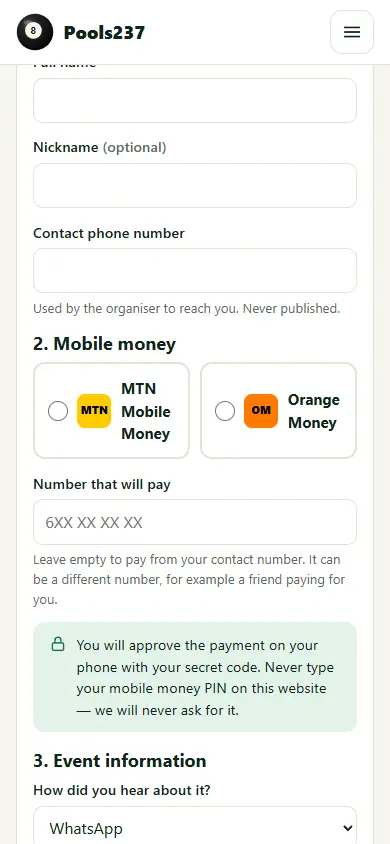
Register & pay with MTN MoMo or Orange Money
- The Register & pay box shows the Entry fee set by the organiser.
- Enter your Full name, optional Nickname and Contact phone number (never published). Referral code and how you heard about the event are optional.
- Choose MTN Mobile Money or Orange Money. The Payment phone number is filled with your contact number; change it if another number pays (for example a friend paying for you).
- Tick that you read the format, entry fee and rules, then press Pay … & register (for example Pay 1,000 FCFA & register) once.
- Your place is held and a payment request appears on the paying phone. Approve it on your phone with your secret code. No message? MTN: dial
*126#; Orange: dial#150*50#. - The page follows the payment and shows Registration confirmed, your reference and the Receipt as soon as the payment service confirms it.
Never type your mobile money PIN on this website. The website never asks for it.
Payment states
| State | What it means | What to do |
|---|---|---|
| Payment pending | The payment service has not confirmed yet. Your place is held. | Approve the request on your phone. The page updates by itself. Do not pay again. |
| Registration confirmed | The payment service confirmed the payment to the organiser. | Keep your reference and access code. Open the Receipt. |
| Payment failed / Payment cancelled | No money was taken for this attempt. | Use Try the payment again if offered. |
| Reservation expired | The time to pay ran out and the place was released. | Try again if places are left. |
| Payment received — the organiser is checking your registration | Money arrived late (for example after the event filled up). | The organiser confirms your place or refunds you. |
| Refund in progress / Refunded | A refund is being made / was made. | Contact the organiser if needed. |
A registration is confirmed only after the payment service confirms the payment to the organiser's server. A screenshot or an SMS alone does not confirm it.
Retrying safely. Try the payment again first checks all earlier attempts. It refuses to charge again while an earlier payment could still go through, and if you already paid.
Finding your registration again. Your private page shows your Registration reference (for example R7KQ2MXP) and your Access code (for example ABCD-2345). Keep both. Find my registration (top of the website) opens your registration with them from any phone, and issues a new private link (the old link stops working). Registrations cannot be searched by phone number. Lost both? Go to the venue with an ID: the organiser can give you your access code.
On the day. Arrive before the start time and give your reference (or show the receipt QR code). Only checked-in players are included in the draw.